So You Got Roasted. What's Next?
Your roast already set up your Legate space. Here is what to do with it next, from drafting in your voice to tracking competitors and scheduling posts.
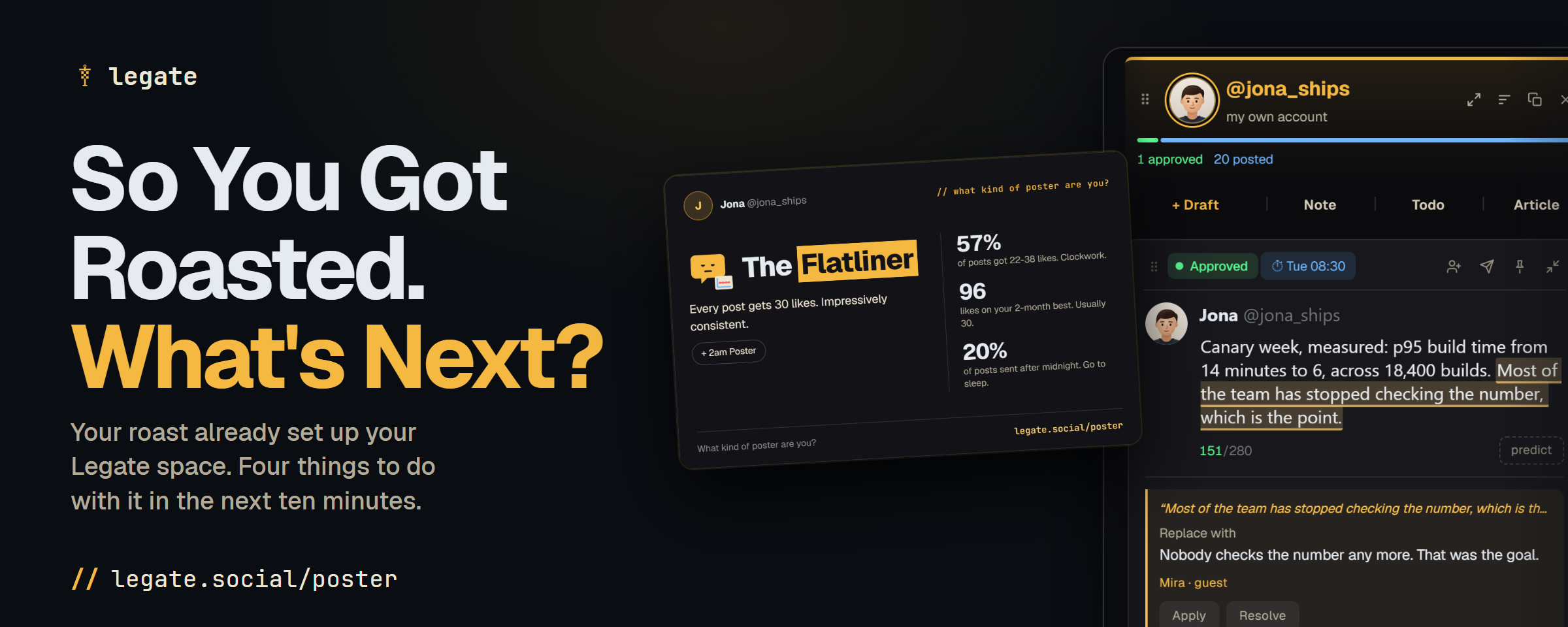
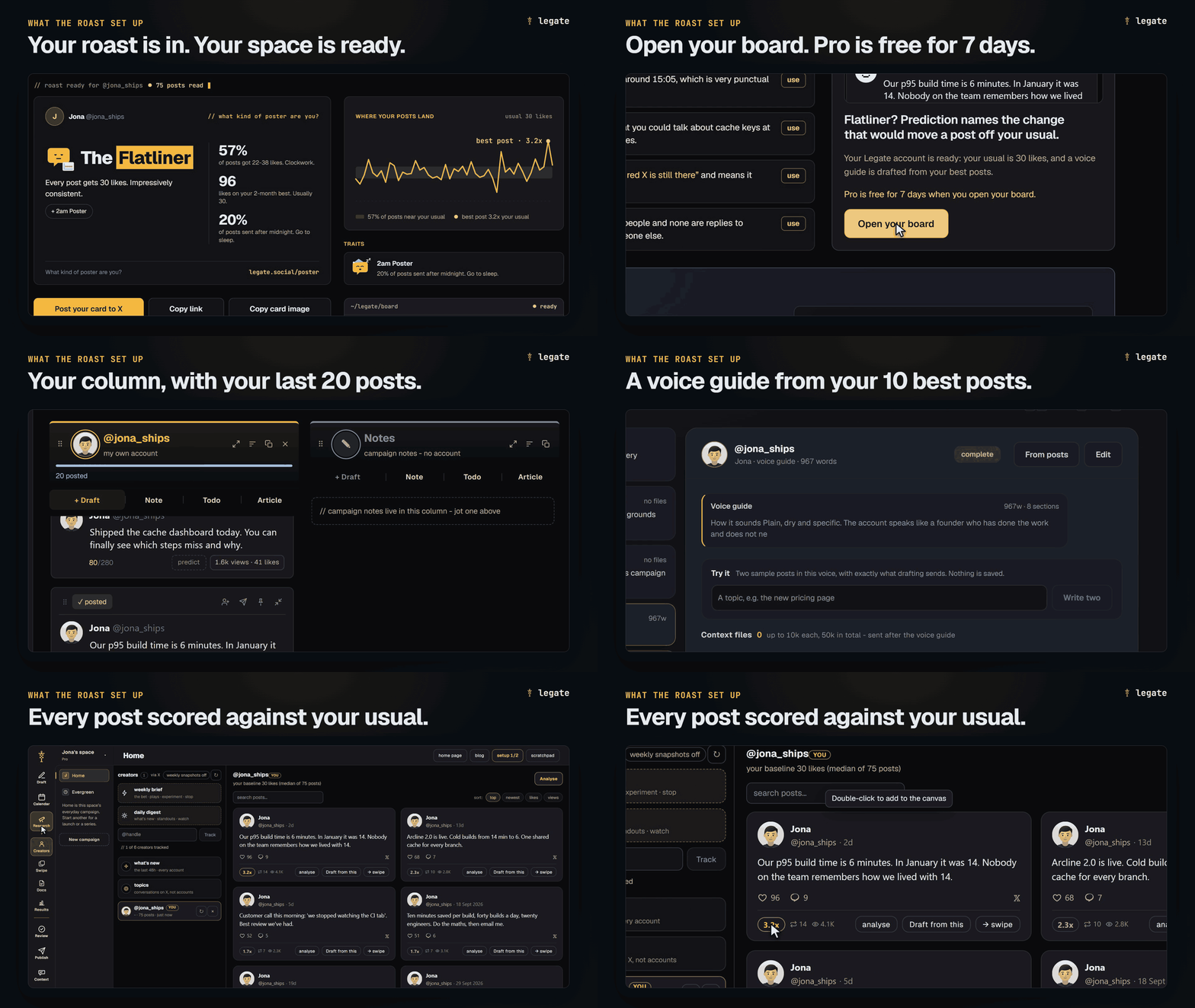
When you signed in with X at legate.social/poster, Legate read your last 75 posts to work out what kind of poster you are. While it was building your card, it also set up your Legate space so your own data is waiting for you when you open it:
- Your board column: Your
@handlesits on your Home board at legate.social with your last 20 non-reply posts, their views, and their likes. - Your voice guide: Legate took your 10 most-liked posts and drafted a voice guide for your account on the Context page, so the AI already knows how you write.
- Your baseline in Research: All 75 scanned posts are saved in Research, with your usual (your median likes) and your top-performing posts already scored against it.
- 7 days of Pro, free: Clicking Open your board starts a 7-day Pro trial with 1,050 X credits and 1,167 AI credits included. It takes no card and cancels itself after seven days if you do nothing.
Here is what to do next to get real use out of it.
1. Draft a post and edit it with AI
Open your Board at legate.social, where your @handle already has its own column. Because Legate built your voice guide during the roast, every AI draft and edit in your column already follows your sentence length, your openers, and your vocabulary.
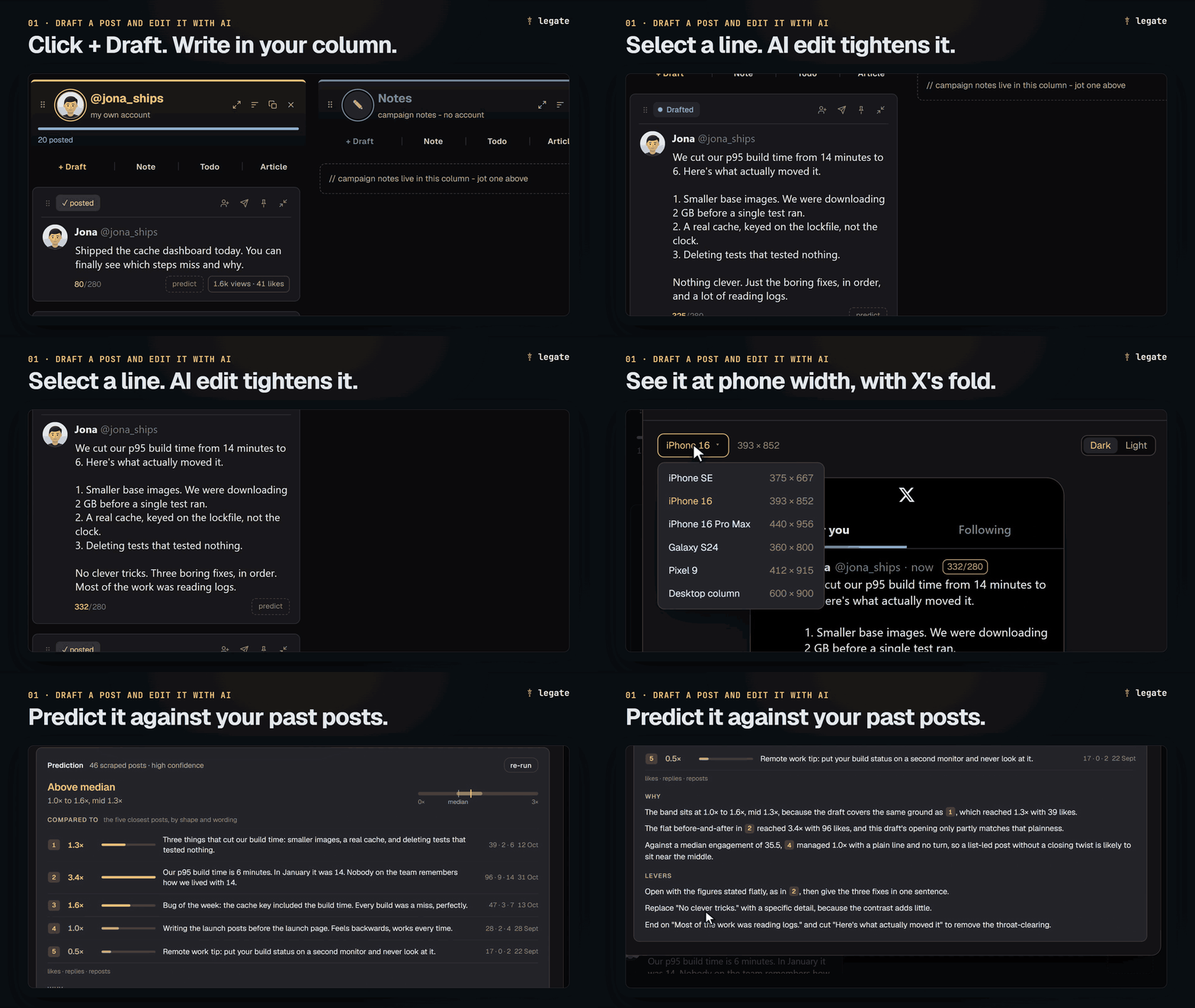
You can put a post together and refine it directly on the card:
- Start a draft: Click + Draft at the top of your column to write inline, click ✨ (Generate) in the top bar and enter a topic to have Legate write a first pass in your voice, or open the scratchpad from the top bar to talk through a rough idea with the assistant first.
- Edit with AI: Highlight any part of your draft (or the whole post) and open the AI menu to tighten it in place. You can use presets like Make it punchier, Condense, Improve structure & spacing, or Rewrite as thread start, or type your own custom instruction.
- Check the phone preview and Prediction: Before the post goes near X, open the card preview to see how the text wraps on six screen sizes, from a Galaxy S24 to X's desktop column, with X's
Show morefold marked in place. Legate puts the fold where X cuts a long post, about 280 characters in, so your hook has to land before that cut. Then click predict on the card to compare the draft against your closest past posts, see its expected range against your usual, and get the two or three changes most worth making before you publish.
2. Add competitors or creators in Research
Raw numbers on X mislead when you compare accounts of different sizes. Sixty likes is a slow afternoon on a large brand account and the best post of the month on a smaller one.
Open Research (legate.social/?view=research). Your own account is already tracked there, with every post scored against your median - such as 2.4x - so you can see which of your own topics and formats beat your baseline.
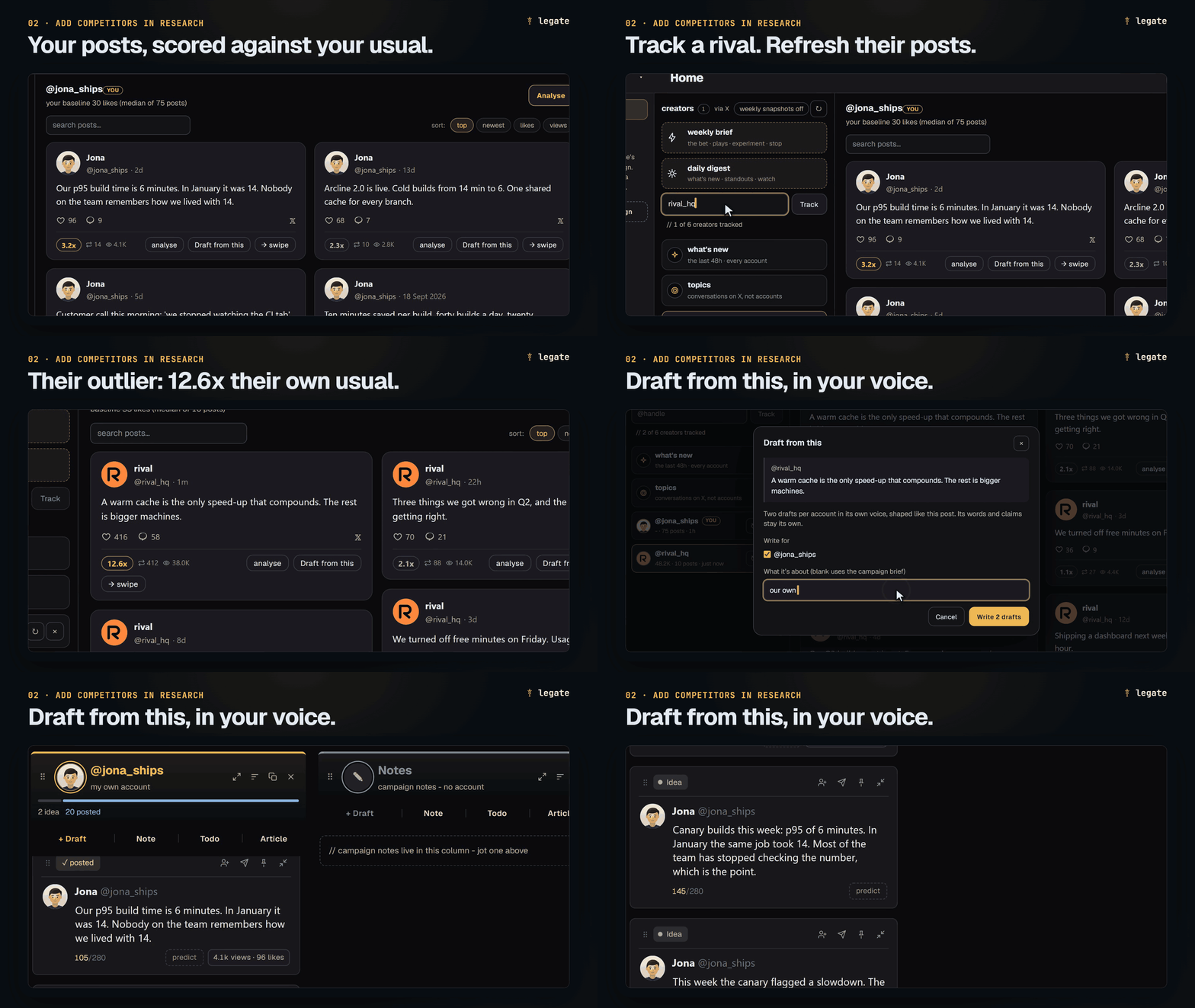
Add two or three competitors, peers, or creators in your niche. Refresh one and Legate pulls their recent posts and scores each one against that account's own usual, so a breakout format on a smaller account stands out right away. When you spot an outlier post worth learning from, save it to your swipe file or click Draft from this to turn its structure into a new draft in your column, written in your voice.
3. Check your voice guide and add context
When AI writes generic copy, it is usually missing two things: the rules of how your account talks and the facts about what you do.
Open Context from the left rail to review what your AI reads before every draft:
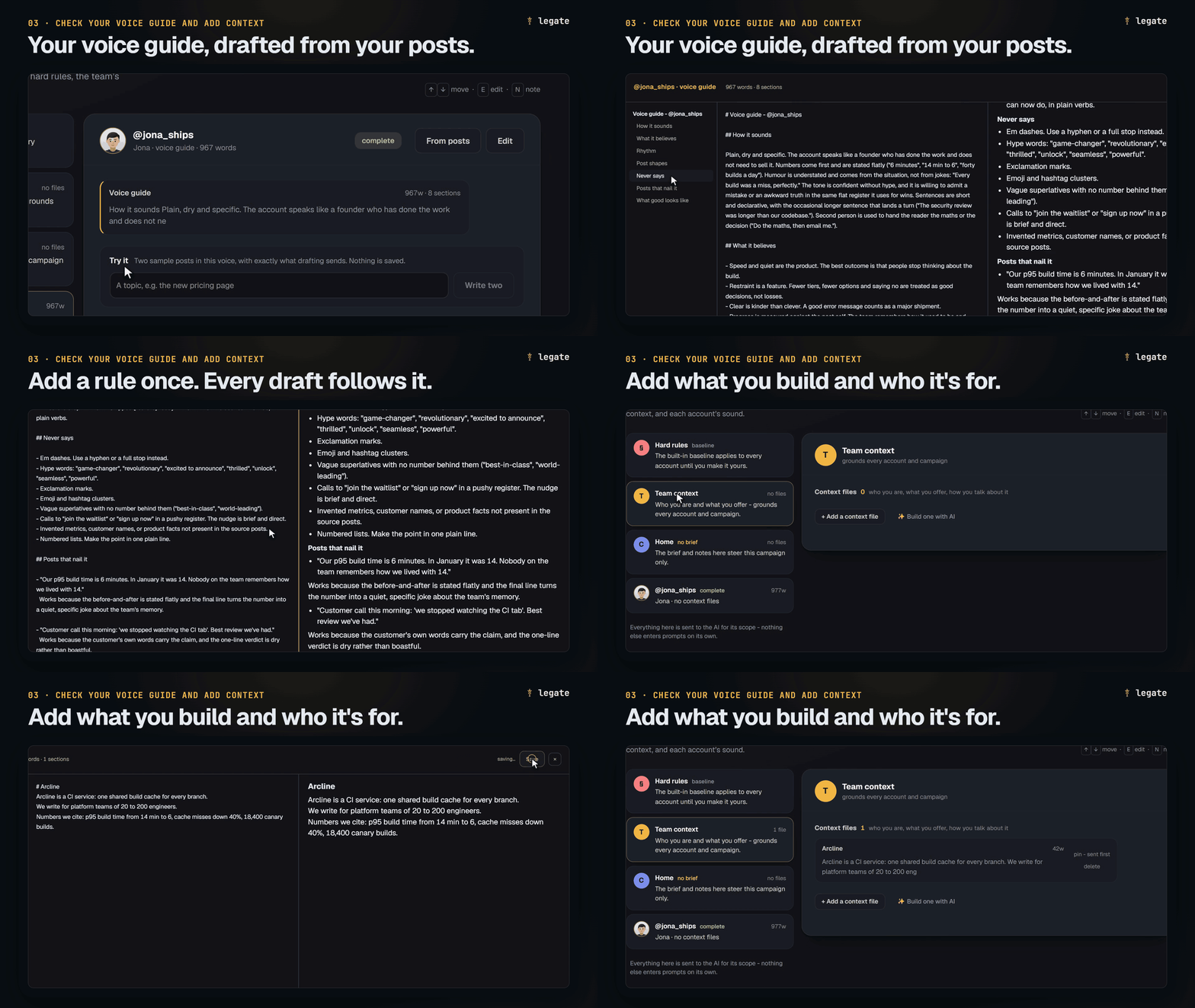
- Your account's voice guide: Read through the guide Legate drafted from your 10 best posts. It sets out how you sound, your rhythm and sentence length, the shapes your posts take, and what you never say. If the roast caught you as The LinkedIn Refugee, The Hashtag Enthusiast, or The Lister, add a one-line ban here once and every future draft and AI edit will follow it.
- Team context: Add a short note on what you or your company builds, who you write for, and the product facts or numbers you cite often.
Once your context notes sit on this page, every draft generated or edited in your column uses them automatically, and you never have to paste background notes or sample posts into a fresh chat window again.
4. Connect your X account to post, schedule, or add a second account
Once your first draft is ready, you can run the rest of your publishing workflow from the same board:
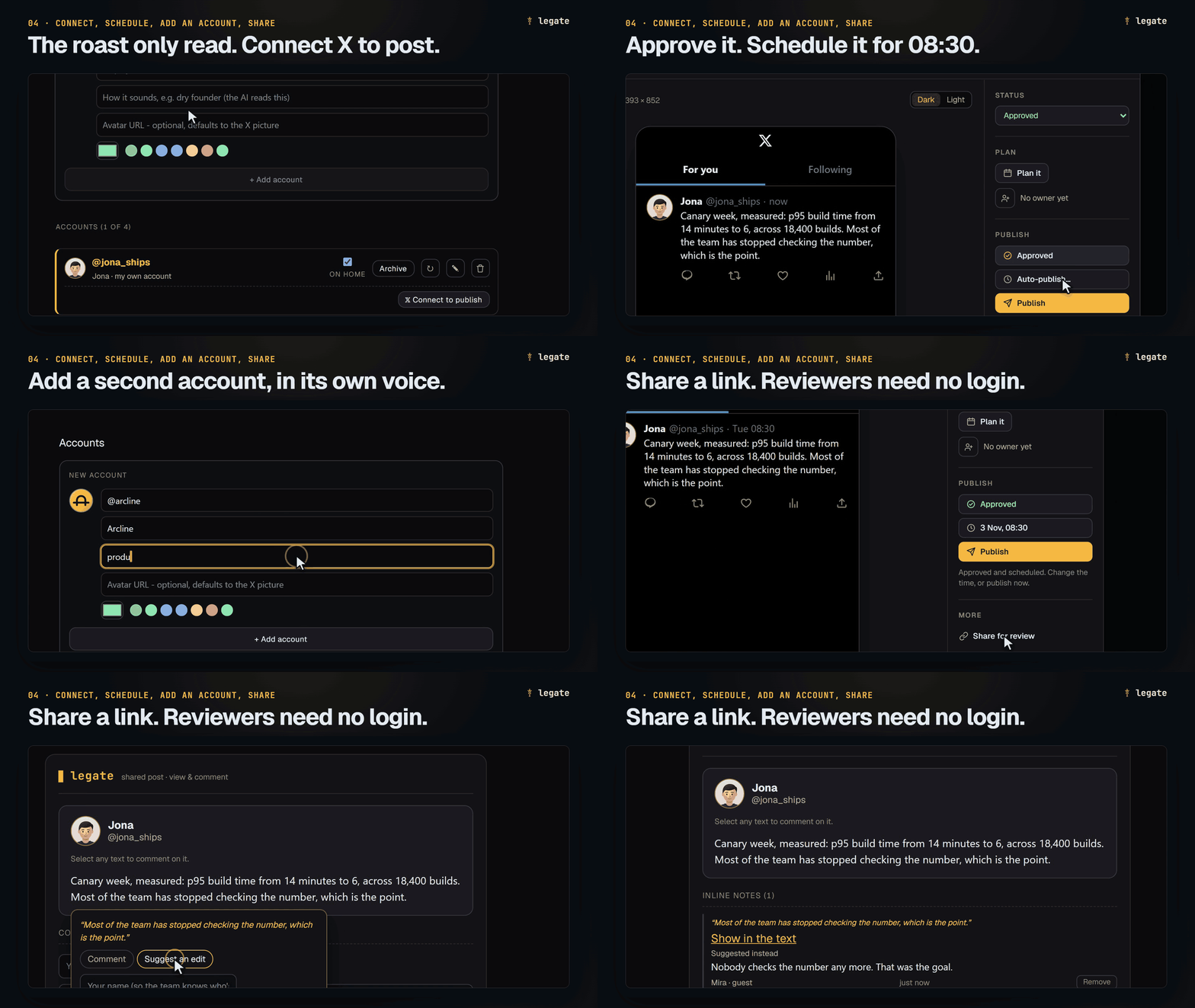
- Connect to publish and schedule: Signing in for the roast only used read-only access to your posts. To publish or schedule from Legate, click Connect to publish in Settings → Accounts. If you got roasted as The 2am Poster or The Weekend Warrior, approve your draft and schedule it for when your audience is awake. If you got The Ghost or The Monday Motivator, add your best approved posts to Evergreen slots so Legate re-runs them on your recurring schedule without repeating a post inside its repeat gap (30 days by default).
- Add a second account: If you also run a company, product, or founder account, add it as a second column on the board and build its voice guide from ten of its best posts. Each column drafts and edits in its own voice guide, so your brand account and your personal account stop sounding like the same person.
- Get sign-off with a share link: If a teammate in your space needs to approve a post before it goes out, click Request review and it lands on their Review desk. For a co-founder or client outside Legate, click Share for review and send the link. They can open it on their phone, read the post, and highlight any phrase to comment or suggest replacement text, without a Legate login. Editing a single word after sign-off resets the approval automatically.
5. Join the Legate Discord for creators and marketers
Alongside the product, we run the Legate Discord as a community for creators, founders, and marketers who run X accounts and want to compare notes on what lands:
- Feedback before you post: Drop a draft or a hook and get a second read from other people running X accounts before it goes out.
- What is working on X: Share and break down the hooks, formats, and campaign launches people have run, with the real numbers behind them.
#roast-wall: Post your roast card, see everyone else's, and find out who else got your poster type.
Open your board
Your 75 scanned posts, your baseline, and your draft voice guide are already waiting in your space at legate.social. Open your board to start your 7-day Pro trial, draft your next post in your voice, and come say hello in the Legate Discord.